Activating and deactivating
Use Activate and Deactivate to control whether a gift card can be redeemed. Deactivating does not delete the card or change its remaining amount.
One gift card
- Open Appointments → Catalog → Gift cards.
- Open the row menu on the gift card.
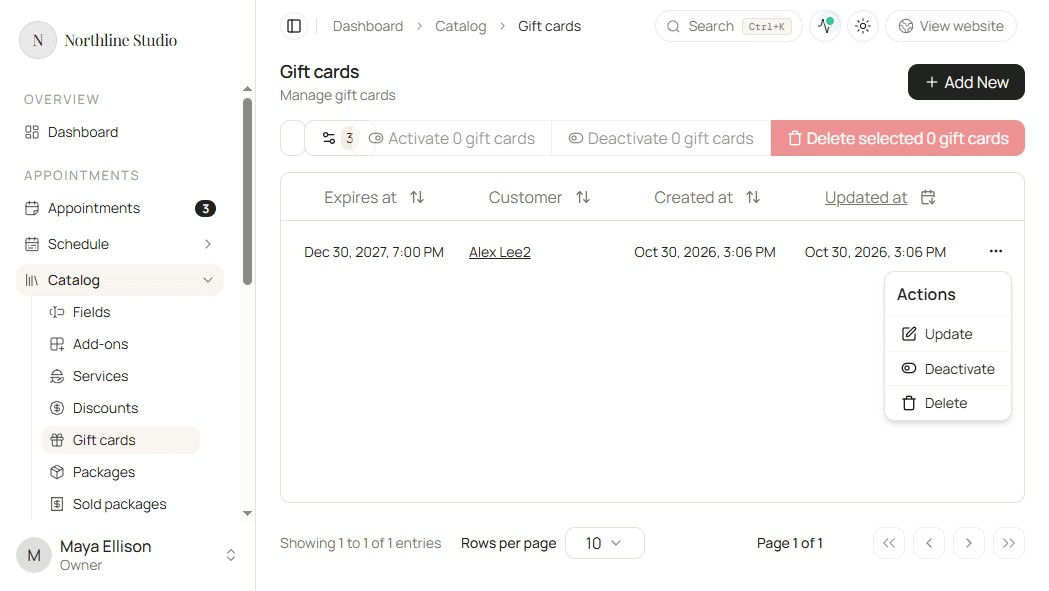
- Click Deactivate when the card is Active.
- Click Activate when the card is inactive and activation is allowed.
Activate is not offered while a payment-link payment is still Pending or Cancelled. Finish or replace that payment first, then try again.
Several gift cards
- Check the rows to change, or use Select all.
- Click Activate or Deactivate for the selection.
- Confirm in the dialog.
What happens next
- An Active card can be applied to payments while it has amount left and has not expired.
- An Inactive card stays in the list but cannot be redeemed until you activate it again.
Good to know
Expired cards and cards with no amount left show their own status badges. Activating does not extend an expiry date - edit Expires at on the gift card if needed.