Good to know
These notes cover limits and links that cut across listing, creating, updating, and deleting services.
Free plan limit
The Free plan includes one service. When you already have one, Add New, Add from template, and Clone stay unavailable until you upgrade to Solo (or higher). Edit or delete the existing service anytime; you just cannot keep a second one on Free.
Creating is not the same as bookable
Saving a service only stores it in Catalog. Clients cannot book it until it is on Settings → Appointments → Services and packages.
After you create a service, Hacado asks Add this service to booking availability? Choose Add to available services to make it bookable now, or Not now to leave it in Catalog only. You can change that list later under Services and packages.
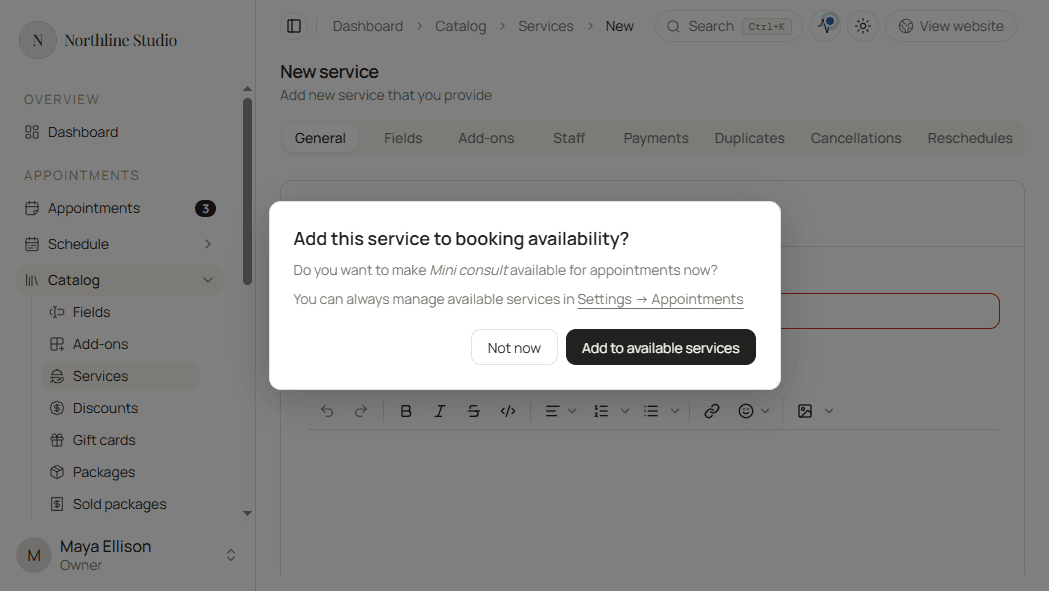
Editing a service later does not show that dialog again and does not change availability by itself.
Staff and booking
A service with no members assigned on the Staff tab is not available for booking. Assign at least one member. When two or more people can deliver the same service, add each member and use price or duration overrides as needed.
Related Catalog items
Lighter first-time path
If you are still finishing setup, start with Set up your services, then return here for every tab and control.