Email layout
Email layout is the page around the message. Every email has one. You cannot delete it. Select it from Document structure, or click the empty canvas, then open Inspect.
You can always open this by clicking Styles.
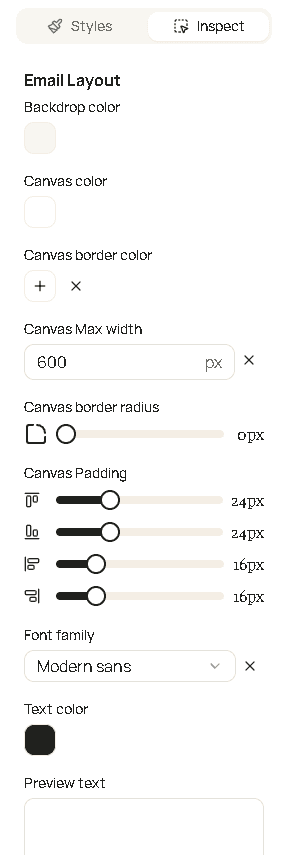
| Field | What it changes |
|---|---|
| Backdrop color | Color outside the message card. |
| Canvas color | Background of the card. |
| Canvas border color | Line around the card. |
| Canvas max width | Card width in pixels. A whole number from 500 to 1200. |
| Canvas border radius | How round the card corners are. A whole number, 0 or more. |
| Canvas padding | Space inside the card. Four sides. |
| Font family | Default typeface. Inherit uses the default font used by recepient’s email client. |
| Text color | Default color of the words. |
| Preview text | The inbox snippet next to the subject. It is not a paragraph in the email body. Email clients use this to show short summary in the email list. Use this to give your customers quick idea what this email is about |
Blocks you drop on the canvas sit inside this layout.