Conditional container
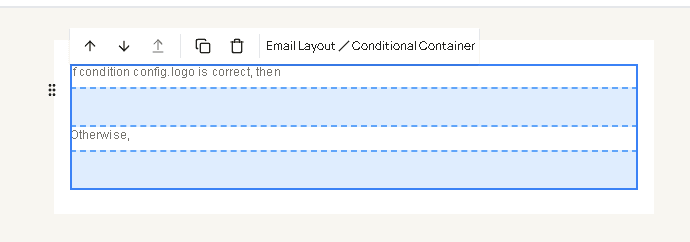
Conditional container sends one group of blocks when a JavaScript expression is yes, and the other group when it is no. Drag it from Containers. Put the yes blocks in the first area and the fallback blocks in the second. The canvas reads “If condition … is correct, then” and “Otherwise”.
The sample sign-in email uses it for the logo, with the condition config.logo.
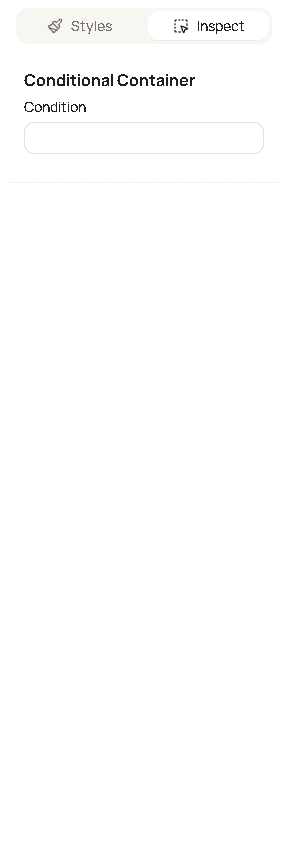
| Field | What it changes |
|---|---|
| Condition | A JavaScript expression. Yes sends the first area. No sends the second. Do not wrap it in {{ }}. |
There is no separate color or padding on this block. Style the blocks you put inside it.
Where the names come from
The names are the same data as placeholders. Open View context, or the braces button on the builder toolbar. Each name at the top of that list is a variable. A placeholder {{customer.name}} is the expression customer.name here. Drop the braces.
Preview fills the variables with the sample booking. The email that is sent uses the customer and appointment on that send. A sign-in message does not have addons or dateTime. Use only names that appear for that message.
Nested fields use a dot: customer.name, service.price, config.logo, dateTime.isTomorrow.
Yes or no
Hacado does not look for the words true or false. It asks whether the result counts as yes in JavaScript.
| Result | Counts as |
|---|---|
| A non-empty piece of text, such as a logo URL or a name | Yes |
| A number other than 0, including a length | Yes |
true, such as confirmed or dateTime.isTomorrow | Yes |
false, 0, or "" | No |
| A missing value | No |
| Any list, even an empty one | Yes. An empty list is still a list. Test addons.length when you mean “has at least one”. |
Any object, such as discount or member | Yes, when that object is present |
These are the usual yes/no checks:
| Expression | Yes when |
|---|---|
config.logo | A logo is set |
!config.logo | No logo |
customer.email | The customer has an email |
member && member.jobTitle | The staff member has a job title |
member?.jobTitle | Same check. ?. stays no when member is missing, instead of breaking the expression |
discount | The booking has a discount |
confirmed | The appointment is confirmed |
pending | It is still a request |
declined | It was declined |
canceled | It was canceled |
noShow | It was a no-show |
dateTime.isTomorrow | The appointment is tomorrow in the business time zone |
meetingInformation | The appointment has a video meeting |
addons.length | There is at least one add-on |
packageUsage && packageUsage.isPackageAppointment | A package covers this appointment |
confirmed, pending, declined, canceled, and noShow are already yes/no. You do not have to compare the status text yourself.
Comparisons
Compare the raw value, not the formatted string. service.price is the number 50. service.priceFormatted is text such as $50.00, and that text changes with currency.
| Expression | Yes when |
|---|---|
service.price > 0 | The service has a price |
service.price >= 100 | The price is 100 or more |
totalAmountLeftToPay > 0 | Something is still due |
totalAmountPaid === 0 | Nothing has been paid |
addons.length > 1 | More than one add-on |
duration.hours >= 1 | The appointment is at least one hour |
dateTime.hour >= 12 | The appointment is at noon or later |
service.name === "Demo service" | The service name is exactly that text |
status === "confirmed" | Same answer as confirmed |
=== is an exact match. !== is not that value. > , < , >= , and <= are for numbers. Text matched with === is case-sensitive: "Demo service" is not "demo service".
A formatted date is a poor comparison. dateTime.full changes with language and time zone. Prefer dateTime.isTomorrow, dateTime.hour, or the status flags.
Combine tests
&& means both. || means either. ! flips the answer.
| Expression | Yes when |
|---|---|
confirmed && addons.length | Confirmed, and there is at least one add-on |
!canceled && !declined | Not canceled and not declined |
discount && discount.discountAmount > 0 | A discount took money off the total |
payments.some(payment => payment.isDeposit) | One of the payments is a deposit |
payments.some(payment => payment.isGiftCard) | One of the payments is a gift card |
|| means either side may be yes. A request that should also match a confirmed appointment is:
pending || confirmedsome walks a list and is yes when any item matches. Other payment flags on each item are isOnline, isCash, isInPersonCard, isTips, isPayment, isRescheduleFee, and isCancellationFee.
When the expression fails
A path that does not exist, such as addons.length on a sign-in email, does not send the first area. The fallback area is sent. The same happens for a typo, or for member.jobTitle when there is no member. Use member?.jobTitle, or member && member.jobTitle, when that value is only sometimes there.
Good to know
- The first area is the yes result. The second area is the no result. Leave the second area empty when a no result should send nothing.
- Put a Loop container in the yes area when the rows should appear only if the list has items. The loop’s own Value is documented on Loop container.